In the current day and age, having internet access at your fingertips is as normal as having water and electricity.
However, having a decent internet connection in your motorhome is not a guarantee. We have been travelling to many places where it was really hard to get any connection going, and at times it was really frustrating. Especially if you want to look up information about locations, you anticipated visiting and fail to do so due to loss of internet connection.
In this article, we will be talking about motorhome internet, why you want it and the different ways to get internet during your travels.
Reasons why you want internet
More and more, we want to be able to video chat with our relatives during our trips or watch a movie on Netflix when the weather is bad. But we also rely on an internet connection while on the move. For instance, while navigating with Google Maps or Waze. And we so often use apps on our phones like Park4night to find a spot for the night or myLPG.eu to find a place to fill up our LPG tank. Then we don’t even take into account apps we often forget we use, like banking apps and parking apps, to name a few.
For that you need internet. There are not many people that don’t have direct access to the internet on their mobile phones. However, there are times when you don’t have a connection to the mobile network at all. We have had some blind spots in Germany and Scandinavia, where we didn’t even get any mobile signal, so even calling was impossible. At those times, you find out how often you use your phone to look up something on the internet.
Although some blind spots – where there is simply no signal at all – are inevitable, there are certainly things you can do to improve the chances of having an internet connection in your campervan or motorhome.

How connecting to the internet works
When at home, connecting to the internet is easy. You connect your device to your own private wireless (Wi-Fi) network at home, and voila, you have internet access. To make this all magically work, there is a device in your home called a router. Simply put, this router does three things: it connects to the internet, often through a broadband connection like a cable or glass fibre network, and creates a Wi-Fi network for you. Then, it routes information between devices connected to the Wi-Fi network and the internet.
Your mobile phone uses the mobile data network of your mobile provider for your internet connection (when you are not connected to a Wi-Fi network). Dependent on your location and subscription, this can be relatively fast (5G or 4G network) or relatively slow (3G or 2G network).
So, while on the road, you can use your mobile phone. In that case, you will have to rely on the strength of the signal that is received by your phone, which might not be that strong, resulting in slow internet speeds. You might also want to connect other devices to the internet, like your iPad or laptop. So you need a way to connect all these devices in some way.
Below we will discuss different ways of connecting to the internet on the road and ways to get a better signal, resulting in faster internet speeds.
READ MORE: The difference between camper, motorhome, RV and van
Ways to get motorhome internet on the road
There are a couple of options to get internet on the road for all your devices. The first is to share your mobile’s internet connection with other devices, so these devices can access the internet through your mobile. For this, you might want to consider buying a local SIM card to use in your phone, to prevent excessive costs from your regular mobile provider.
You can also get a router for your motorhome that generally works the way a router works in your home. This is a small device that connects to the internet and creates a wireless network you can connect to so you can access the internet. The last option is to use satellite internet.
Share your mobile phone’s internet connection
You are probably used to having internet on your mobile. And might not even think about the fact that this is different if you are outside of your home country. Often, the use of internet on your mobile phone in foreign countries is limited. The amount of data you can use depends on the subscription you have with your provider. In case not all your travelling companions have internet available on their phones, you might want to share your connection with others by creating a “Wi-Fi hotspot”. This way, you share your internet connection by creating a Wi-Fi network that other devices can connect to. This works for other phones, but also for iPads, laptops, etcetera.
How to set up a Wi-Fi hotspot is a little bit dependent on the phone you have. You can find an instruction for Apple iPhones here and for Android phones here (although for Android phones, it might depend on the brand how to do this).
You can set a password that people will need to connect to your Wi-Fi network, so it cannot be used by others. After switching the hotspot on, others should be able to see the Wi-Fi network and connect to it. And voila, they can use your internet connection!

Get a local SIM card for your phone
When using the SIM card of your own provider, you might be limited in the amount of data you can use in foreign countries. Also, your phone will switch to the network of the foreign provider that your provider has an agreement with. In some cases, this provider might not be the one that provides the best signal for the area you are travelling in. One way to avoid this is to buy a SIM card from a provider in the area. In most countries, you will be able to buy a “prepaid” SIM card that you can stick in your phone and gives you a fixed amount of GB (the amount of data you can use) to use. Often, these cards can be recharged through the website of the provider.
Another significant advantage to buying a local SIM card is that you can save money. In our case, we both have a subscription where we can use up to 50 GB per month in the EU, but buying extra GB is quite expensive. We used a lot of data when we were travelling due to Natalie working and the weekly YouTube videos we needed to upload, so our combined 100 GB was often not enough for us. It made sense to shop around for local SIM cards to save money, and it might be for you too!
Pro tip: It might be worthwhile to buy a SIM card in one country and use that in other countries too. We found that the SIM card we bought in Finland (Elisa Saunalahti Prepaid Unlimited 4G) offered 50GB per month of internet in Nordic and Baltic countries. So we used this SIM card in Norway, too, since Norwegian prepaid SIM cards were much more expensive. However, make sure to read the fine print here. Although the website stated Unlimited 4G in the Nordic and Baltic countries, up to 50GB was considered fair use, and our speed got limited to “hardly usable” after using that amount of data.
Use a mobile internet dongle
An alternative to sticking a foreign SIM card in your own mobile phone is to use a mobile internet dongle to provide a device with mobile internet through USB, like the Huawei E3372-325. Again, you will have to buy a (local) SIM card with data and then put the USB into the device that needs internet, like your laptop. Since this will only provide internet to a single device, and the device needs to have a USB port and be supported by the dongle, we would not recommend going for this option.
Use a Mi-Fi router
As we talked about before, your home probably has a Wi-Fi network to which all devices connect. If you buy a Mi-Fi router like the TP-Link M7350, a simular Wi-Fi network will be created in your motorhome. These mobile Wi-Fi routers connect to a mobile provider through 4G or 5G, and you will be able to connect multiple devices to this router so that everyone can use the same internet connection through the SIM card installed in the router. Of course, you can use a local SIM card in these routers too!
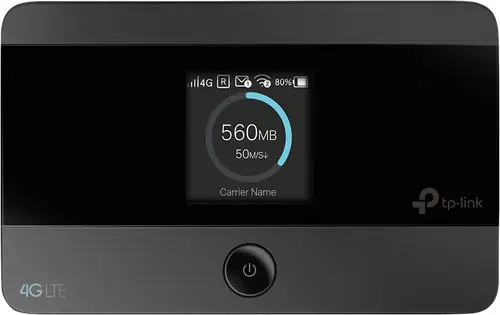
One of the advantages of a Mi-Fi router is that you can take it with you to other locations, or if the connection is not that great, you can see if you get a better signal outside. One of the disadvantages of these routers is that they often use batteries to operate, so you should regularly check if they need to be charged!
Another thing you need to keep in mind: these things are not waterproof. So dropping them in a dog’s water bowl will drown them – we have empirical evidence!
The TP-Link M7350 will set you back around 80 to 90 euros, so this might be a good investment.
Install a fixed Mi-Fi router in your motorhome
Since Marten is kind of a nerd, he likes to find out other solutions that might work even better. That is why he, in the end, opted for the Teltonika RUT240 router (at the moment of writing, there is an updated version of this router, the Teltonika RUT 241). This router is an industrial router that is more robust than other routers and has a big external antenna attached to it.
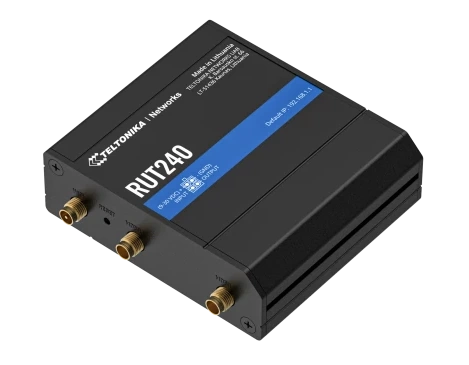
The router can be directly connected to your leisure battery, so you will never find yourself without juice. This router needs more technical knowledge to set up, so it is not for everybody. And, it is quite a bit pricier than the TP-Link with prices around 150-190 euros.
An added advantage of this router is that you are also able to attach other antennas to it, like the Poynting PUCK-8 (mobile network and Wi-Fi antenne, around 110 euros) or Poynting XPOL-1-5G (mobile network antenna only, around 115 euros). Although Marten hasn’t tried this himself, he has heard great things about using an external antenna, but your mileage may vary.
Use satellite internet
The last but most expensive option is to use satellite internet. This form of internet is not dependent on mobile network antennas; communication is directly between your satellite router and a satellite up in the sky.
At this time, the only provider of satellite internet that can be used while travelling is Starlink. The hardware needed to use Starlink sets you back 300 euros, the subscription is 100 euro/month (when ordering from the Netherlands), and it provides coverage in almost all of Europe, the US and/or Canada. Check their website for all information, pricing and limitations.
A thing to take into account is that the standard Starlink hardware cannot be used when in motion. It is a portable setup that can be used at locations that have active coverage. Hardware for in-motion use does exist but is very pricy at 2850 euros.
As you can see, this is an expensive option. But if you combine travelling with working from the road, this might be a good solution for you!
In conclusion
As you can see, there are a lot of ways you can connect to the internet on the road. We started out by using our own phones as Wi-Fi hotspots for other devices to connect to. But we found that this put a big strain on the battery life of the mobile phone that was used as a hotspot. That’s why we then bought the TP-Link M7350 Wi-Fi router, which did an absolutely decent job for its money and lasted much longer on one charge.
In the end, we bought the Teltonika RUT240 router that has a fixed power supply and a fixed spot in our mobile home. This has proven to be a robust solution that works for us.
However, for less tech-savvy users, we recommend the TP-Link router. This thing is plug-and-play and very easy to set up.
If you need a fast internet connection anywhere, anytime (for example, if you are working from the road), you can opt for the Starlink solution. This is an expensive solution but will be a good solution even in the most remote location due to its use of satellites for communication. Who knows, maybe we might get this somewhere in the future.
Pin this: